Member Tracker
Transforming a bulky & disconnected intervention tracking process into a streamlined system
My Role
Senior UX Designer
UX Researcher
TImeline
3 Months
2024 - 2025
Client
Health Insurance Company
The Challenge
A returning client asked our studio to do a new project to help streamline their workflow process for member intervention tracking. The member intervention tracking system responsibility is divided among a large number of employees, and is not a task that is done on a daily basis for any particular person. However, it is also a critical process that helps raise customer satisfaction scores and is a factor in securing customer loyalty.
The current state of the process involved a disconnected manager, development team involvement, and a clunky and unclear flow for case assignees. Our mission was to design custom dashboards for different roles, remove the development team role, and design a dashboard equipped with intentional tools that could not only get the job done but provide useful insight.
Our Impact
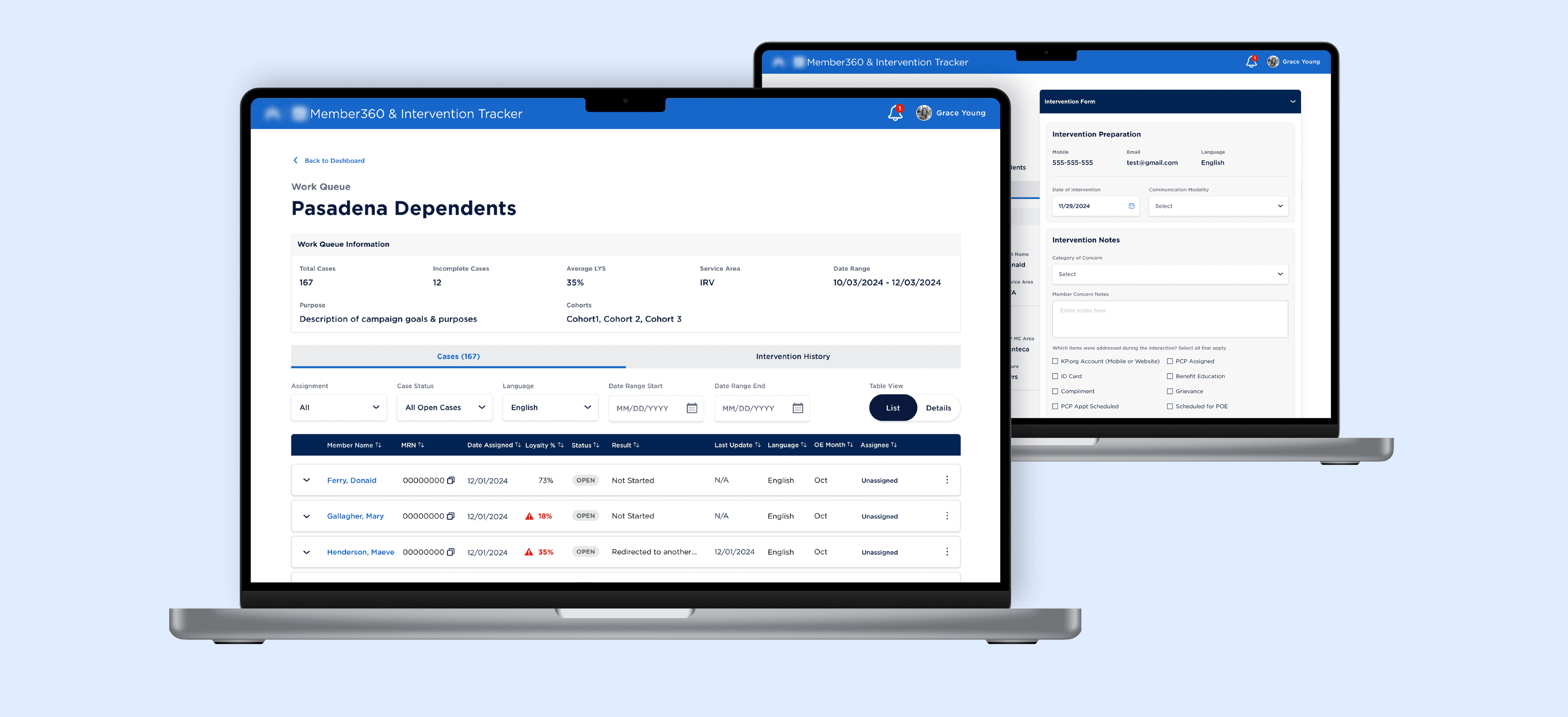
We delivered a high-fidelity MVP prototype of an end-to-end experience highlighting both the manager's and case assignee's redesigned flows, introducing new insight and campaign features, solving targeted pain points identified and supported by research we conducted.
We leveraged and contributed to the design system started from previous projects to create a consistent quality standard for our client, and help secure future design work for our studio.
My Approach
Designing insurance workspace tools that are not intended to be used every day can be a bit a challenge. You cannot rely on muscle memory to speed up the process or expect that every user will understand niche language. I knew that there would be a spectrum of employee types that would be navigating this tool for work, and that we would need to design for all of them.
01 - UX Research
Current state audit
Conduct interviews
Develop personas
02 - Flow Redesign
Pain point identification
Journey mapping
User flow redesign
03 - Design Phase
Design library alignment
Weekly iteration & feedback
Problems solved
04 - MVP Prototype
End-to-end experience
10 mini-stories
Final deliverable
A look into the final MVP prototype for the member intervention tracker.
01 - UX Research
We did not have a specialized UX researcher for this project, I took on the role for the first part of the project to ensure we were solving multiple process issues, removing any roadblocks, and speeding up the required tasks so employees can get back to doing the rest of their responsibilities faster.
Our approach involved a thorough analysis of the current process, interviewing multiple users from each step of the process to gather pain points, and using the insight gathered to create user personas that would guide our designs.
Current state audit
In its current state, the work done for member intervention tracking, case assignment, and analysis was done on multiple softwares.
Assigning cases and insight gathering are both done by managers and the actual intervention work is done by other employees, so having two different dashboards for each type of user does make sense.
However, because information is being downloaded from one software and uploaded to another, a development team is required to coordinate the information transfer and results in a disconnected system.
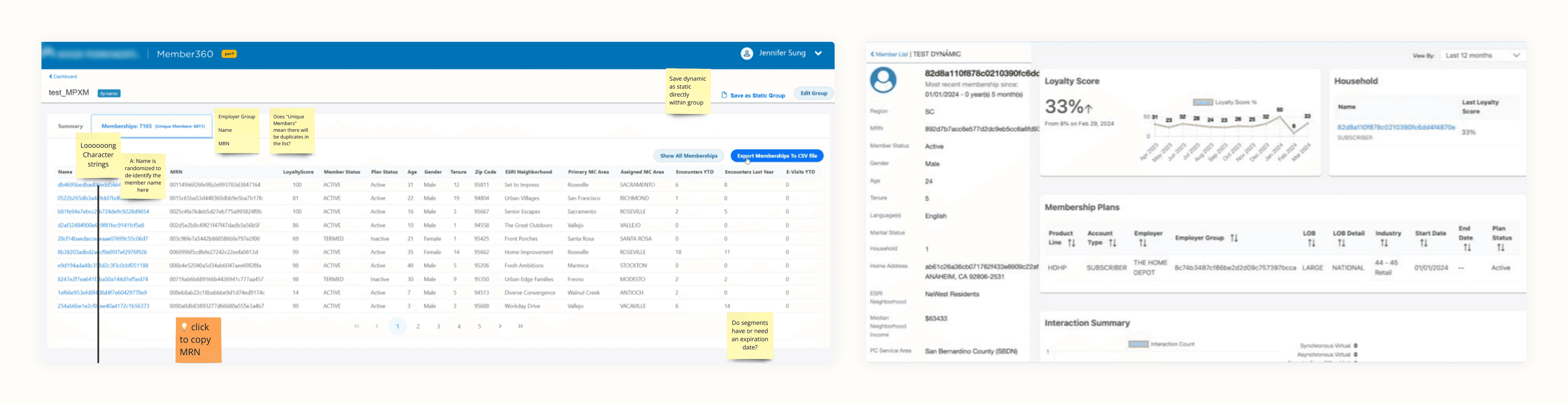
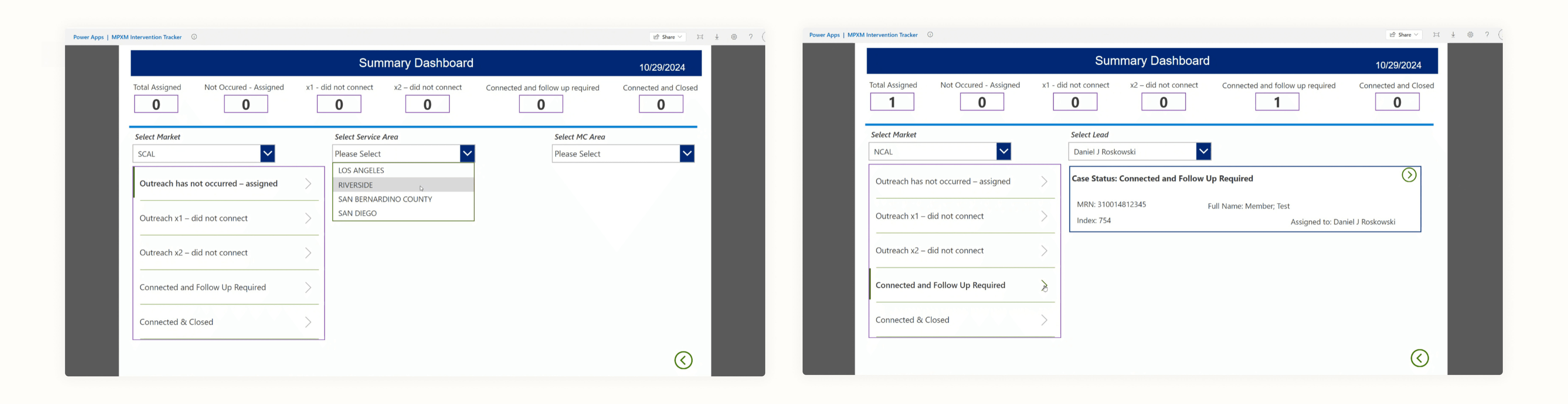
Our attention was immediately brought to the inconsistencies between the manager's dashboard (top) and employee's dashboard (bottom) from a visual brand perspective
We worked closely with our client team to break down the step-by-step process for managers to create an intervention group, assign the case to an employee, and then gather insights from the member dashboard via their Member 360 dashboard.
I then fleshed out the step-by-step process for the case assignees to go from being notified of a new case assigned to a completed intervention. Breaking these down helped ensure we could get details about each step of the process while we conducted interviews.
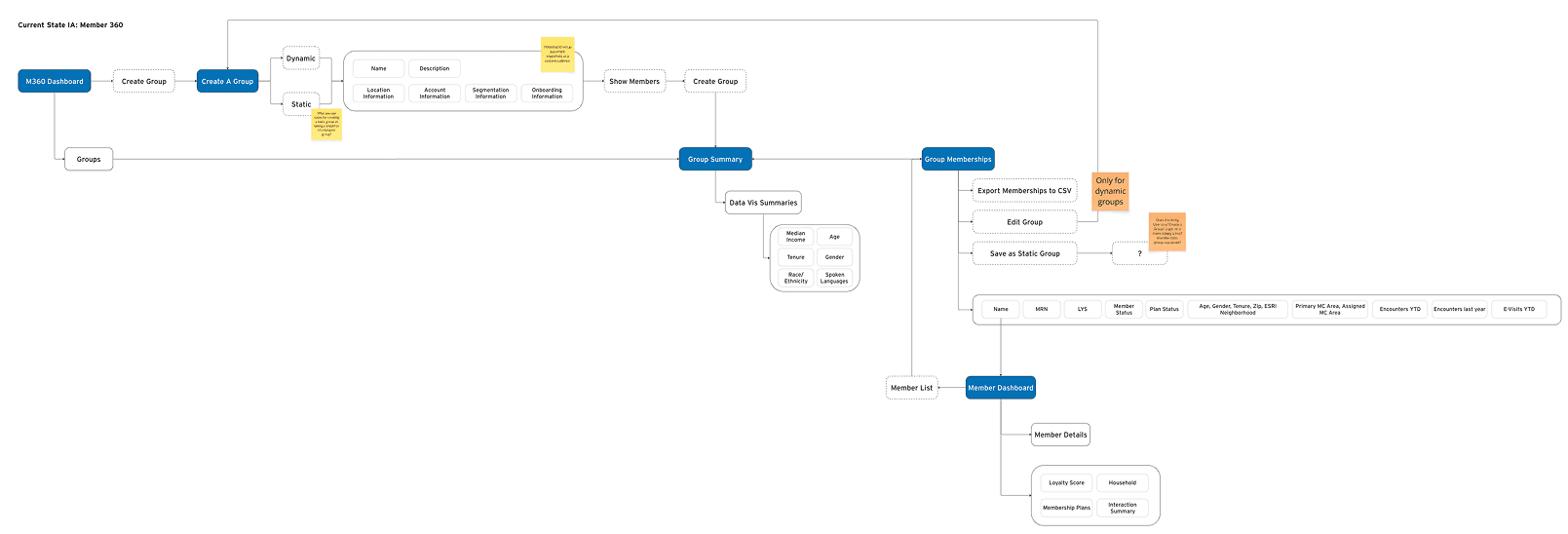

We worked closely with the client to understand the functionality of the manager's dashboard (top) and employee's dashboard (bottom) and understand the high level problems and efficiency goals
Conduct interviews
We asked our client to set up interviews with our design team and different users of the member tracking process, from managers assigning cases and gathering insights, to employees of different levels of experience and time available to work on member intervention tracking.
We had already gathered needs from the stakeholders in terms of the overall vision, but we wanted to get direct feedback from every day users and identify their pain points and road blocks.
design team conducted 8 total interviews across teams
personally led 4 interviews with users and took notes on others
Through our interviews we learned that different offices had significantly different workflows, despite all working on the same platform, and neither office were willing to change how they distribute case assignments. We realized we would have to design something that was flexible enough to accommodate different team workflows without sacrificing efficiency in the process.
Develop personas
Using the results of our interviews to identify the main pain points and needs for each of our user groups, I created 3 user personas – one for each user group. We validated these with the client before kicking off the redesign.
"I need a streamlined method to get cases organized, assigned, and handed off." – Manager
"Ideally, I wouldn't be needed in the handoff process beyond system maintenance." - Dev Team
"I could really use a clear and standardized method of recording interventions" - Case Assignee
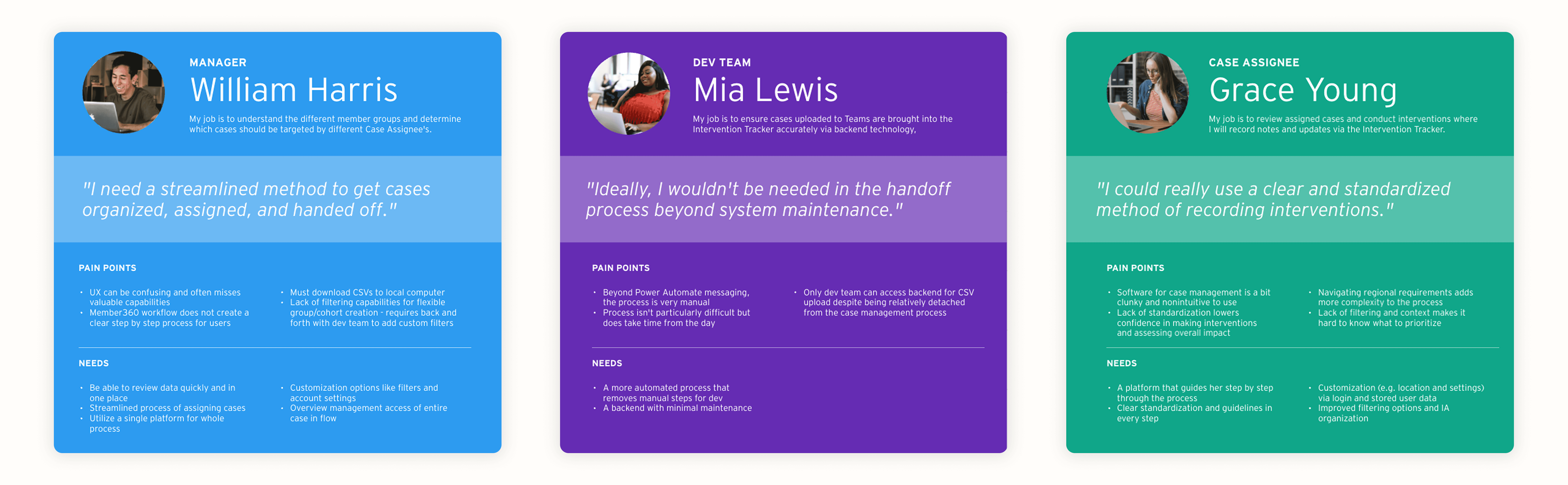
3 personas that would guide our design work moving forward
02 - Flow Redesign
The intervention tracking process has a clear beginning and end, before the results are pooled into an insight dashboard for managers. Because of this linear process involving multiple people, we decided to make a current state journey map to highlight the pain points we identified throughout the experience to our client. I then took our findings and created a future state journey map and user flow.
Pain point identification
I simplified the user flows we had previously created into a linear, overarching step-by-step journey map that tied the three personas together. The current state journey map featured:
applicable and important steps for each moment in the flow were documented
a summarizing quote on the current state tied to each step we learned about in the interview process
bullets summarizing the pain points that had been called out by both stakeholders and interviewees
opportunities and initial ideas our team identified to improve each step of the process
identified opportunities for AI integration in the future – although out of scope for our current project, we included this additional insight with the intention of continuing a longtime design partnership with our client
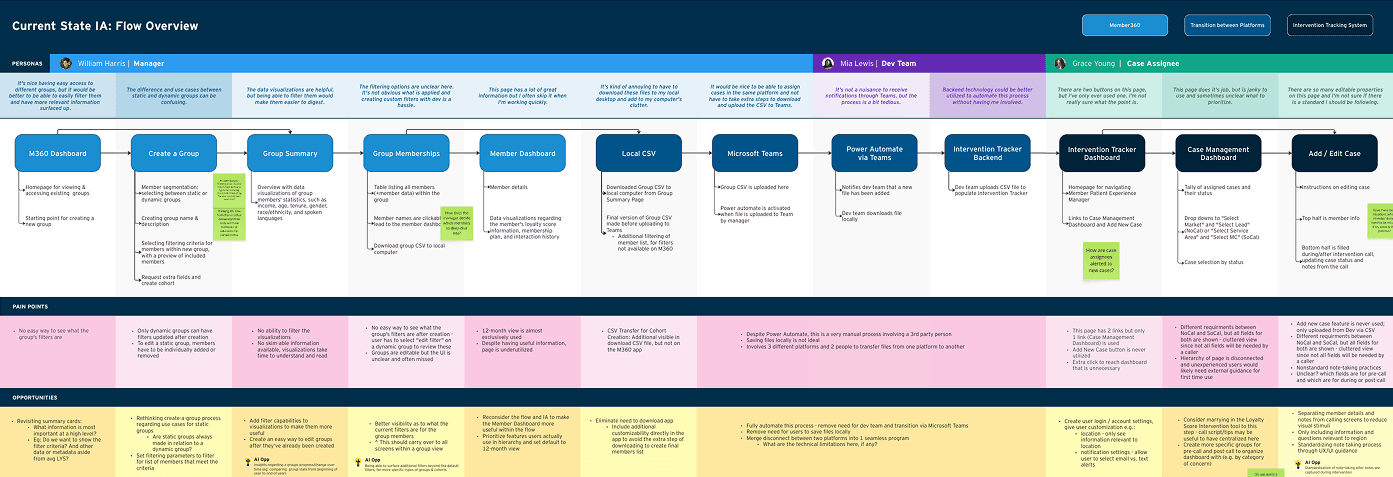
Current state journey map with identified pain points for each step of the experience
Journey Mapping
After validating all of the above research and workshopping our opportunities and goal alignment with our client, I built out a future state journey map and information architecture.
combined two softwares into one program and removed the need for development team involvement
identified parallels / overlap in user experience between manager and case assignee user experience, and broke down the vision for the future state of their individual experiences
noted further opportunities for each step that the journey map flow didn't capture to provide the client with a fully-incapsulated concept map
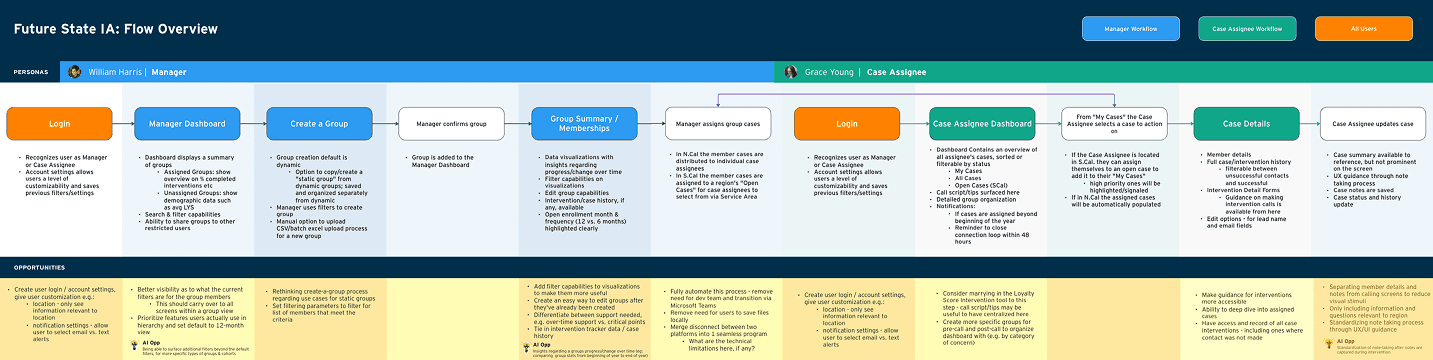
Future state journey map with updated flow and opportunity insights
User flow redesign
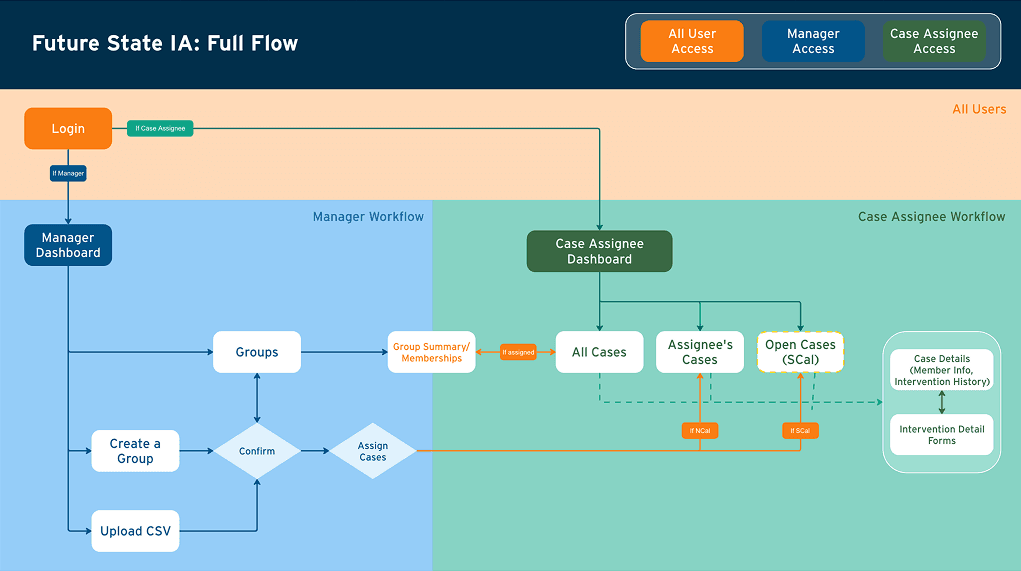
I also designed a user flow that captured the intricacies of the full flow, rather than depicting it linearly.
the goal was not to show every button on each page, but to show our intention in the redesign of simplification and streamlining
I made sure to include a process for both the N-Cal and S-Cal offices and recognized the differences in their workflows, while also acknowledging that they can work in parallel
Current state journey map with identified pain points for each step of the experience
03 - Design Phase
When it came to visual design, we knew we would be aligning with work done previously for the same client and continuing to contribute to a design libary.
We then proceeded to have weekly iterations and frequent client feedback and workshops to get the redesigns to a place that satisfied both the stakeholders and the users.
Design library alignment
We reached out to the design team for previous work and got access to the design library they had started. As we designed our screens, we added newly designed components to the library for future design work.
having an already established visual look and feel allowed us more time to solve UX problems
by aligning each of our client's projects to the same library, we were guaranteeing them a consistency they can expect when choosing to work with us
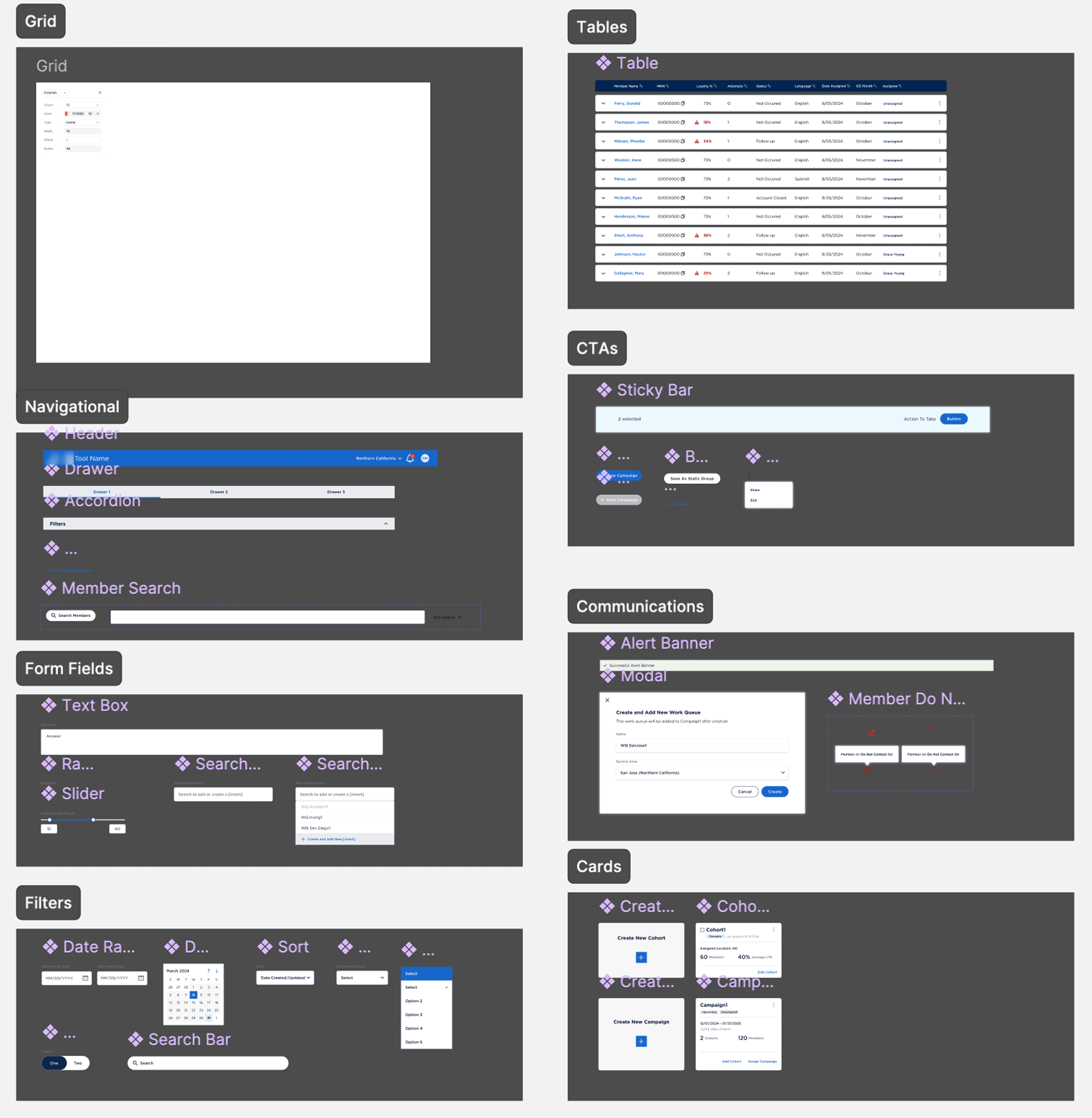
We continued contributing to a design library for our returning client
Weekly iteration & feedback
At this point, the other designer and I divided the work between us. As the senior designer on the project, I felt both user groups had equally challenging problems to solve, so I let the other designer pick which challenge she wanted to take on and provided weekly mentorship as we worked through the screens together.
The other designer took on the Manager screens and I focused on designing the Case Assignee screens.
Weekly feedback sessions allowed us to get validation on our solutions as we went along, and redirect quickly when needed.
opening each session the same way gave our client context for what to expect each week and guidance on where to direct their feedback
we asked for feedback on specific solutions to keep sessions focused, but left room for open-ended feedback in case there was anything we missed
we ensured different stakeholders and users were included in feedback sessions, these different groups focused on different needs and results
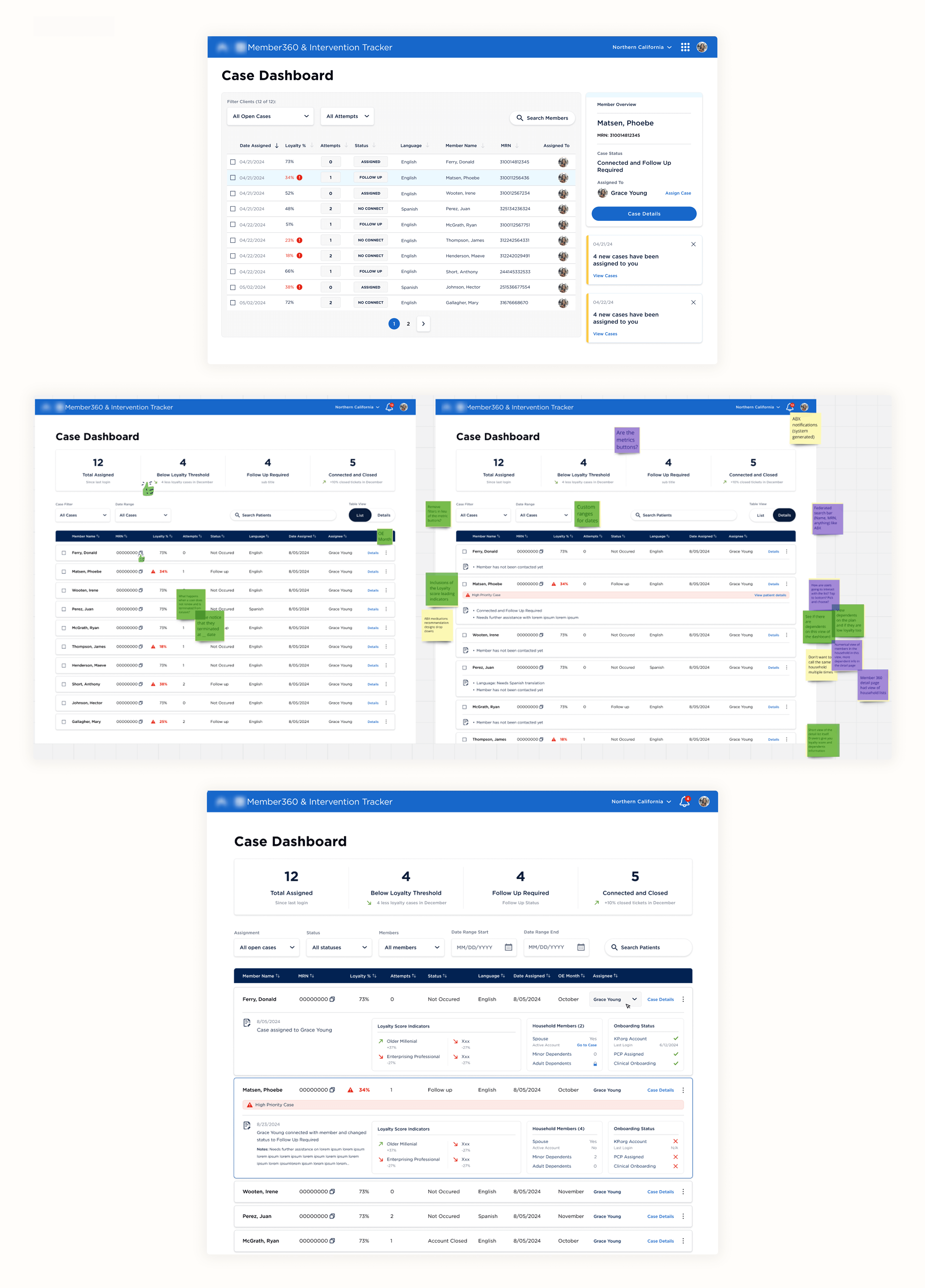
Case dashboard iteration and feedback over the weeks
Problems Solved
We successfully designed a unified experience for both managers and case assignees, removing the need for any dev team involvement. Some other ways my team and I found success for our client in our redesign:
The user's account will determine the dashboard they have access to when logged in.
designed for flexibility between working styles that suited both the N-Cal and S-Cal offices
intervention form screen provides detailed information about our client's clients, with easily accessible scripts and insights to be utilized as needed, as well as an intervention history log
updated notification processes were designed to be both pushed to email for non-daily users and integrated into the software with links to direct needs
created consistency in visual voice throughout our client's internal tools and softwards
redesigned the grouping experience for creating cases and designed for a new campaign-focused method of grouping
elevated the insight dashboards within campaigns and cohorts for management tracking
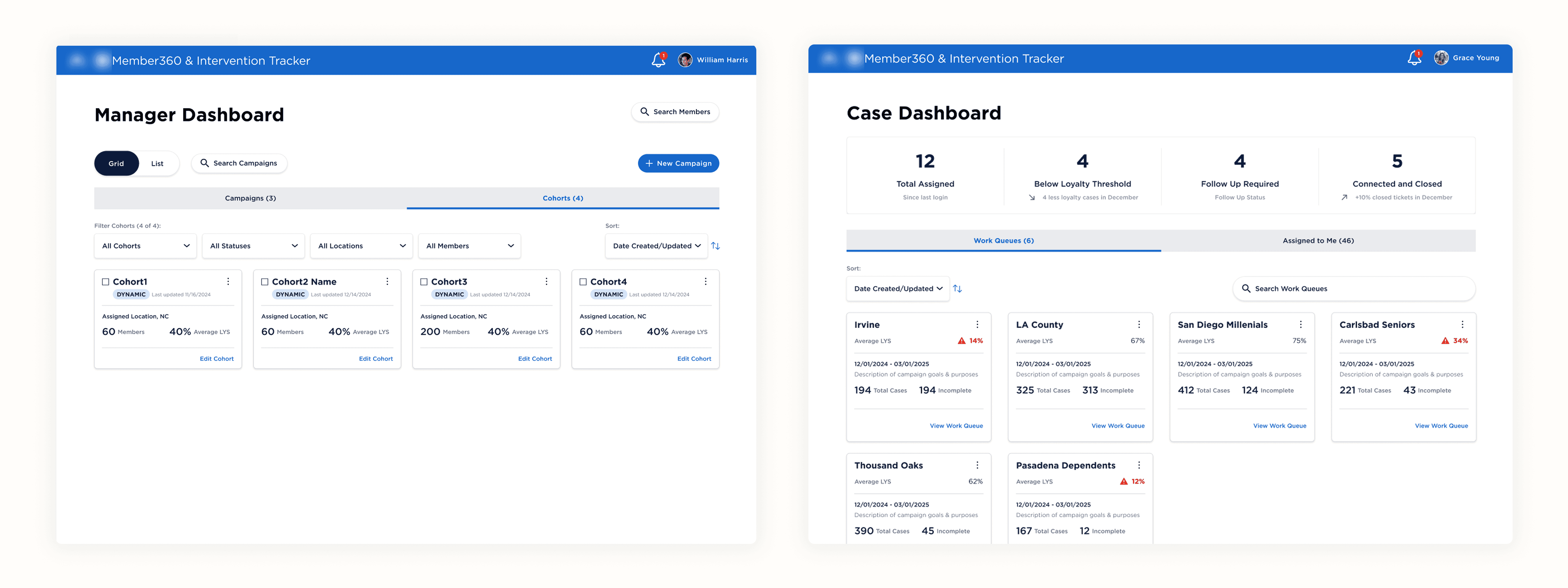
Manager Dashboard (what Manager sees) vs. Case Dashboard (what Case Assignee sees)
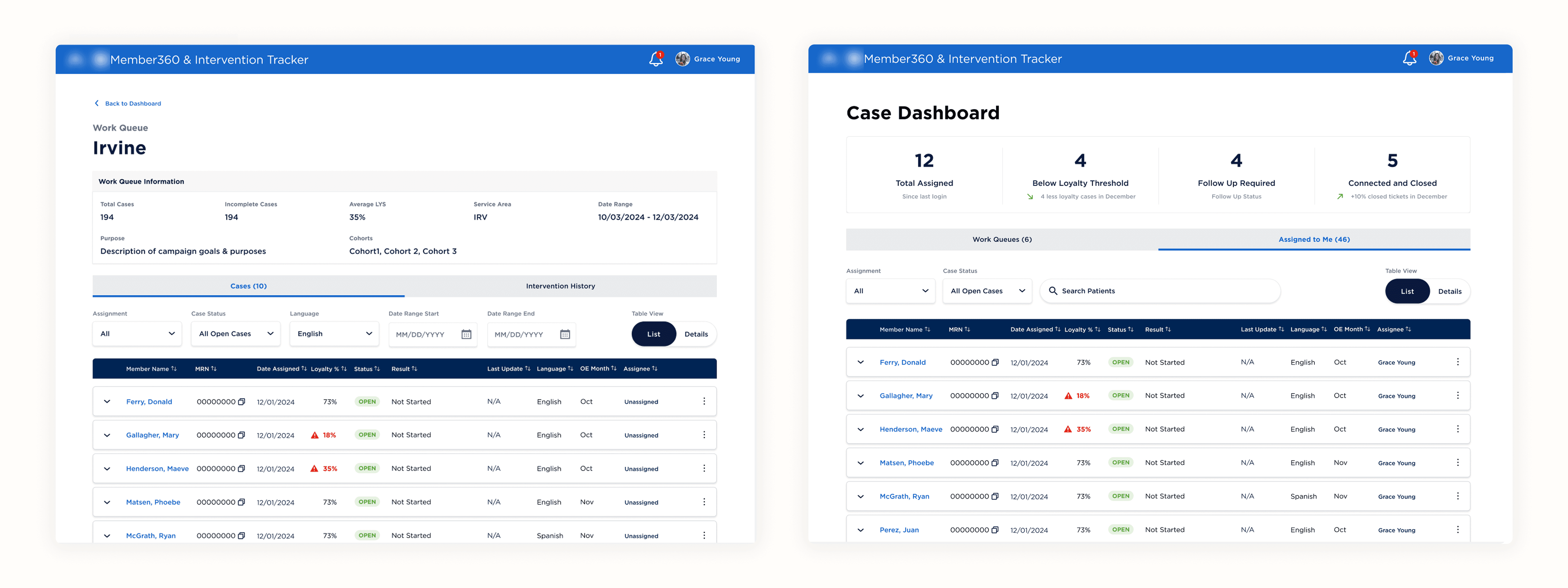
A flexible dashboard for different methods off case assignment
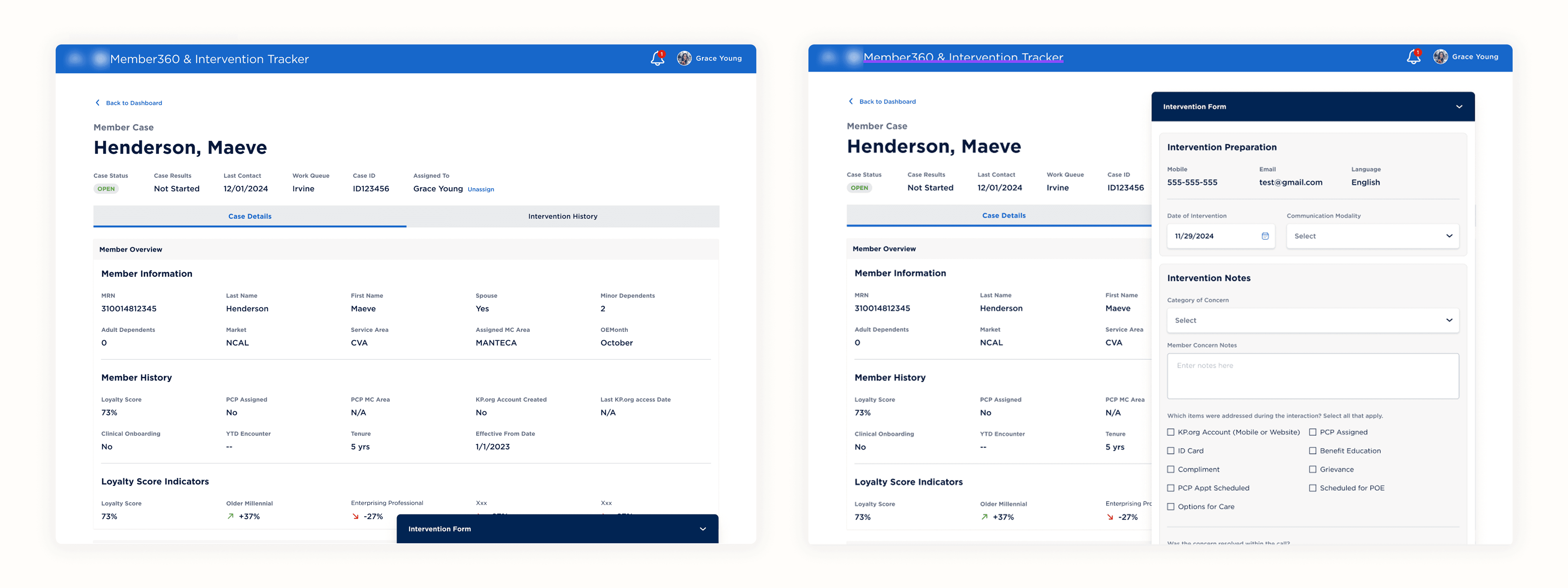
Intervention dashboard provides detailed information, always accessible
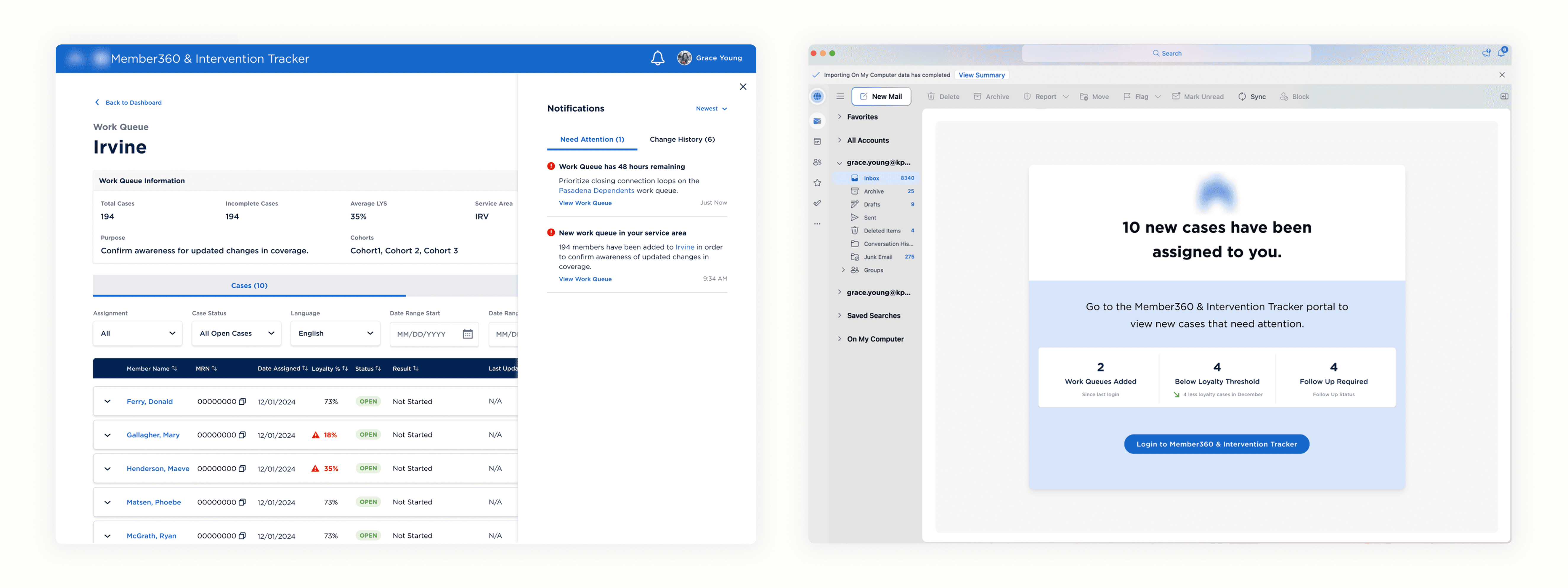
Updated notification processes both in-product and via email
04 - MVP Prototype
As a final deliverable for our client, we created 10 different mini-stories highlighting different features we designed for, alongside our end-to-end prototype experience, as well as 2 appendix features for one-off cases our client asked to have designs prepared for.
End-to-end experience
We built out an all-incapsulating happy path version of the prototype that began with the Manager logging in and ends with an intervention conducted by the Case Assignee and the case successfully closed.
A portion of a click-through of the happy path end-to-end prototype we provided to the client
10 mini-stories
We broke down end-to-end prototype into 10 mini-prototypes that focused on different steps of the process and problems we solved for.
Each section had a title card and description for absolute clarity of the goal & problem solved of each section when handing off to the client.
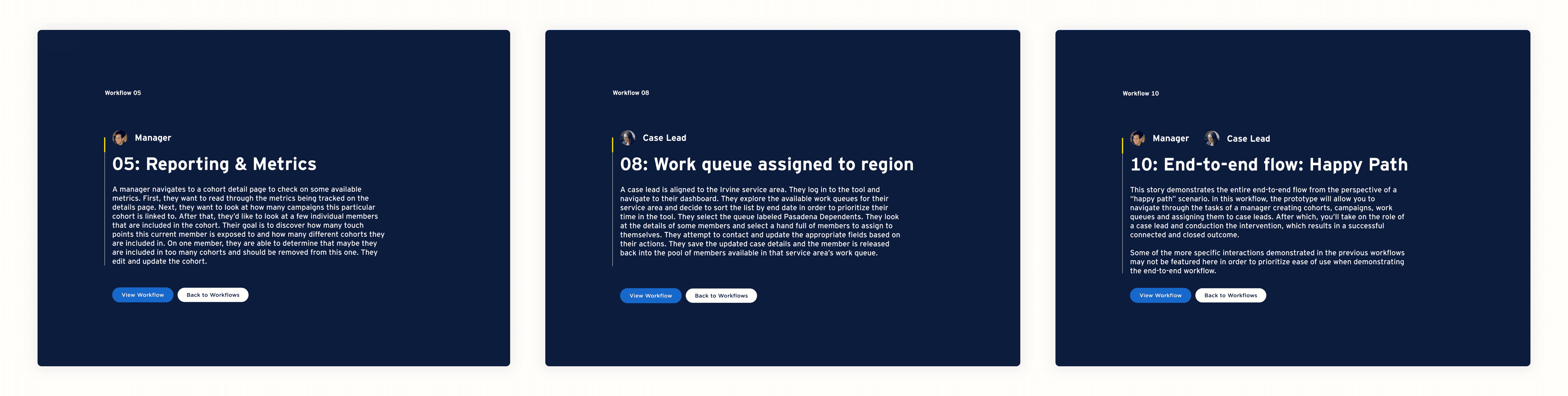
Some of our mini-stories title cards
Final deliverable
Along with all of our concept screens, we also created a working prototype that demos a version of each landing page in the navigation, and some additional concepts.
Throughout our work, I paid extra attention to small details and microinteractions that made the magic of the prototype feel real.
Click through the final MVP prototype deliverable below:
My Final Takeaways
Stakeholders needs should be prioritized, but they don't always align with actual user's needs.
During the interview stage of our research, we learned that the problems our stakeholders had pointed out barely aligned with our user's needs. We were fortunate in our case that the needs were not conflicting – but had we not done the user interviews, we would have never gotten to the core of what every day users of the software actually need to get their job done.
Presenting complex work requires a complex presentation