Cruise iptv
Designing an MVP prototype for a client that doesn't want to just meet the standards, but define new ones.
My Role
Senior UX Designer
Visual Designer
TImeline
3 Months
2024
Client
Global Entertainment Conglomerate & Cruise Line
The Challenge
When a previous client approached our design studio with a project in a new territory for us (IPTV), a team was quickly assembled to take on the challenge. I worked alongside two creative directors, a UX researcher, and another UX/UI designer over 3 months to design a best-in-class IPTV experience that would seamlessly integrate on-ship experiences and elevate the stateroom TV as not just an entertainment device – but an onboard companion.
Our Impact
We delivered a high-fidelity MVP prototype of an end-to-end IPTV experience highlighting hyper-specific qualities of our client's cruise line to encapsulate the experience. Our attention to detail and use of original AI imagery took our work to the next level to secure more work with the client moving forward.
In doing so we unlocked new capabilities for our studio's portfolio and established a new standard for IPTV and visual work to be leveraged on future projects.
My Approach
Leveraging lessons learned from our UX research and competitor audits, I worked closely with the creative directors to establish an information architecture and identify screens for a demo. I then created wireframes, generated AI images in Midjourney, and established a UI utilizing our client's brand colors and assets. Our final deliverable was an end-to-end MVP prototype.
01 - Designing for TV
Current & competitive analysis
Trend forecasting
Determining big wins
02 - Visual Design
Standardized asset library
AI imagery in Midjourney
Validating screen UI
03 - Integrated Experience
Event-based entertainment
Curated social media integration
Sales opportunities
04 - Final Deliverables
Beginning-to-end experience
Additional concepts
Interactive MVP prototype

A look into the final designs for a cruise line IPTV
01 - Designing for TV
Being my first professional experience designing for a remote-controlled interface, I immediately started paying closer attention to something I use nearly every day: my own TV. I started noting what visible elements allowed me to understand where I was in the interface, and how I knew what to expect when I hit left or right on my remote (and, when something happened I didn't expect).
The research phase of this project was extremely thorough, with extensive auditing conducted by our UX researcher and multiple workshops as a design team and with our client. Below are some samples from the research that I helped build out and workshops I participated in.
Current State & Competitive analysis
Our client was only able to provide photographs of TV screens for the current state screens for the IPTV experience.
Our UX researcher managed to find a handful of walk-throughs on YouTube. We used screenshots of these videos to get a better understanding of the current experiences at sea:
determined standard offerings across cruise lines
identified gaps in UX and opportunities
targeted consistent pain points between systems
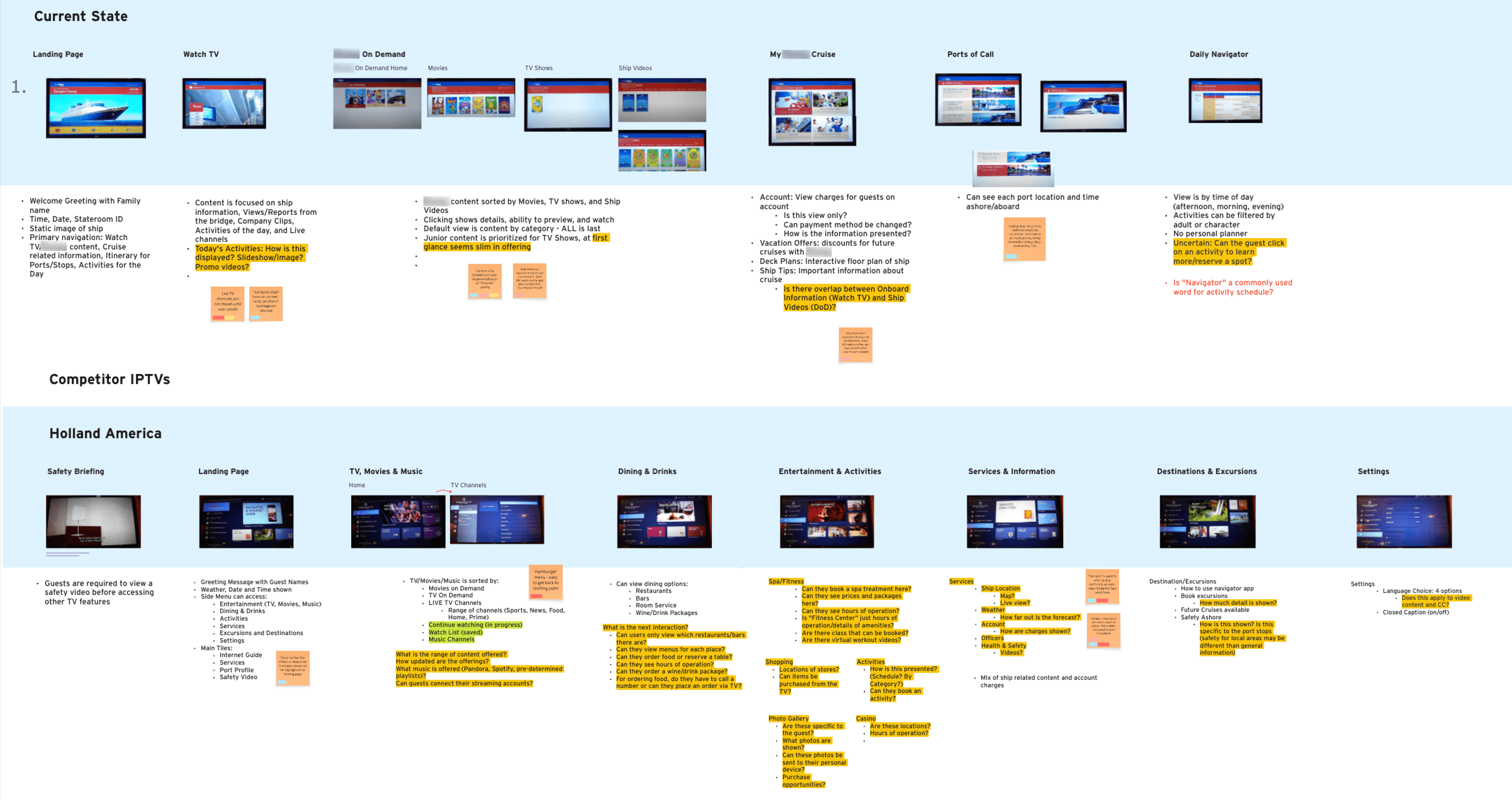
The UX researcher and I worked together to breakdown the current screens & competitor's
Trend forecasting
The goal of the redesign was not to match the best-in-class TVs on other cruise lines, but to become the best-in-class. During insight & trend workshops, our team decided:
the TV will not just serve as an entertainment device but also a manual for the ship & its offerings
on-screen experiences will mimic what the on-board experiences offer, and guests will have the ability to book experiences via their TV
goal stacking - e.g. family photography from cruise staff appearing on TV screen (delight) & offer photography package purchase (sales opportunity)
& more…at this stage, no idea was too big or too small
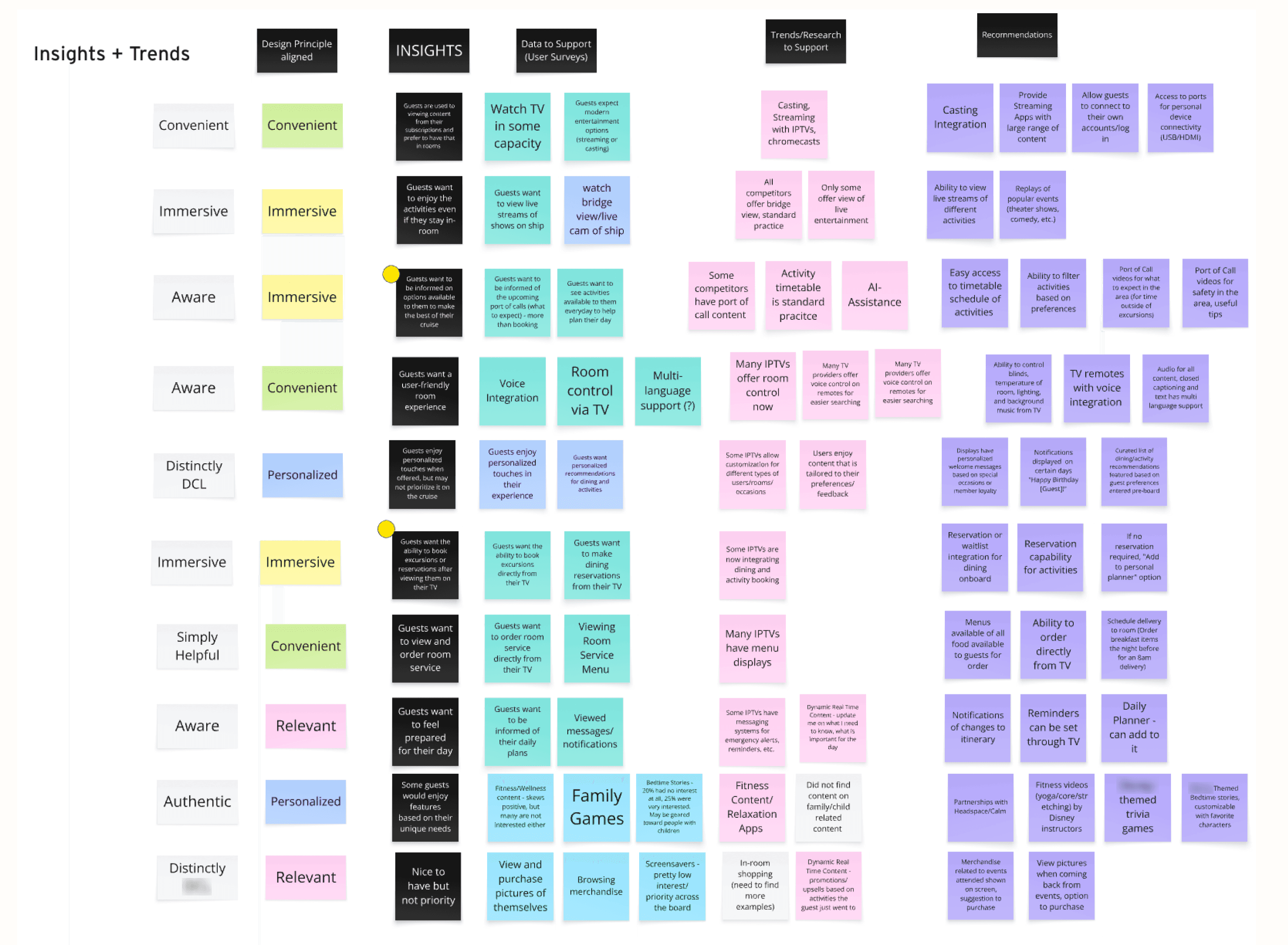
Our creative directors led initial insight & trend workshops
Determining big wins
We took our generated ideas and separated them into near state and future state pools.
We then sat with our client and development team to chart near state ideas onto a 4-quadrant graph:
what wasn't worth trying (high risk, low value)
clear wins (low risk, high value)
and big bets (high risk, high value)
As you can see from the chart to the right, the client approved the majority of our ideas for design, noting which ones might take longer to implement but viable.
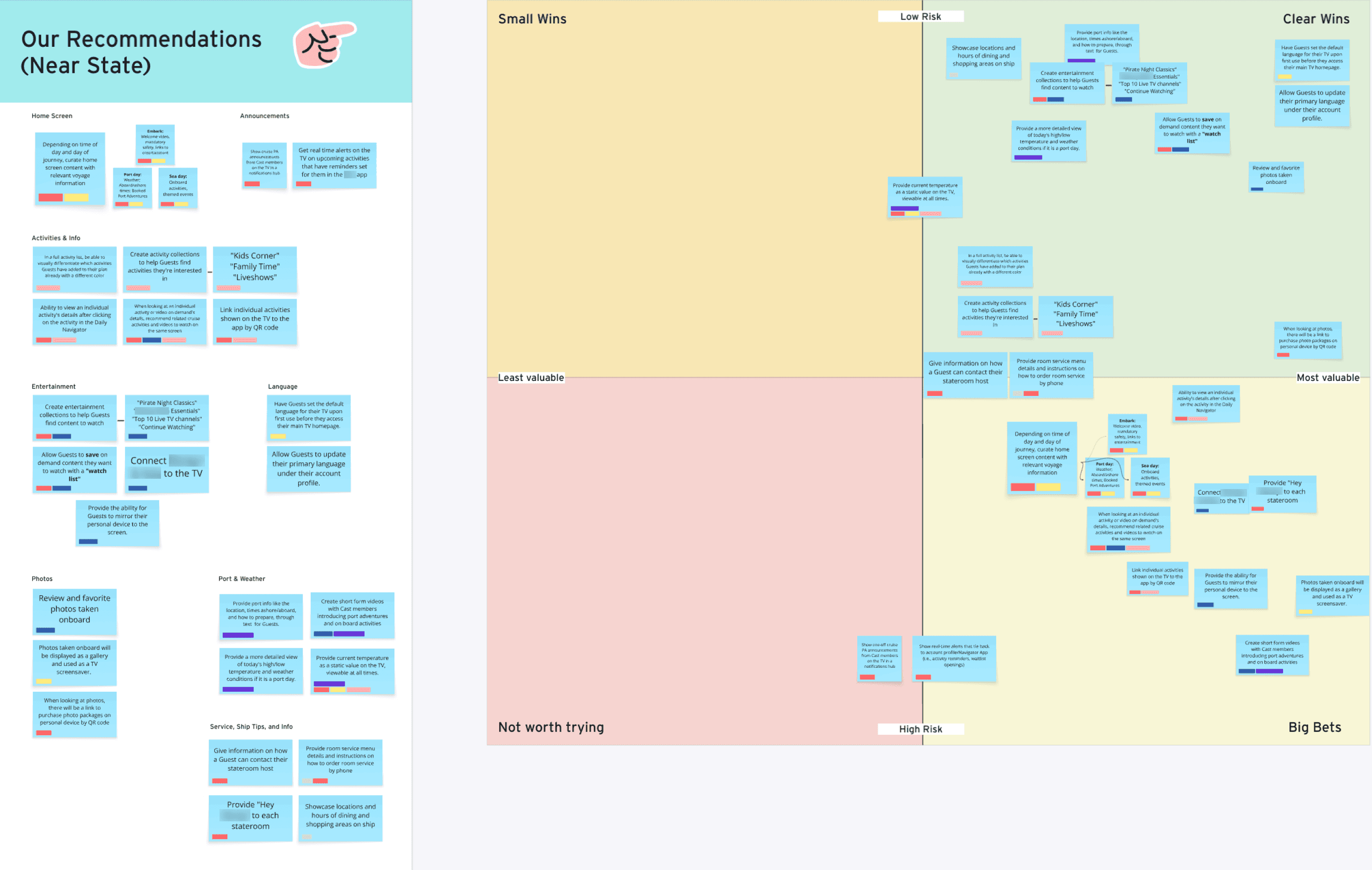
Part of the results from a workshop with the client determining Wins & Bets
02 - Visual Design
Once the information architecture designed by the creative directors was approved – the client went with a service focused version for the IA – the other designer began rapid wireframing and I began establishing our visual style. We only had a 2 week turnaround time to establish a visual look & feel and standardize UX elements due to the large scope for deliverables.
Standardized asset library
I began by compiling client-provided imagery, videos, conceptual visuals, and designing basic UI assets to begin building out screens.
began an asset library for rapid design once wireframes were approved
determined grid, sizing, and spacing standards
established color palette and consistent enabled / focus CTA states (TV requires a consistent focus queues for dynamic CTAs)
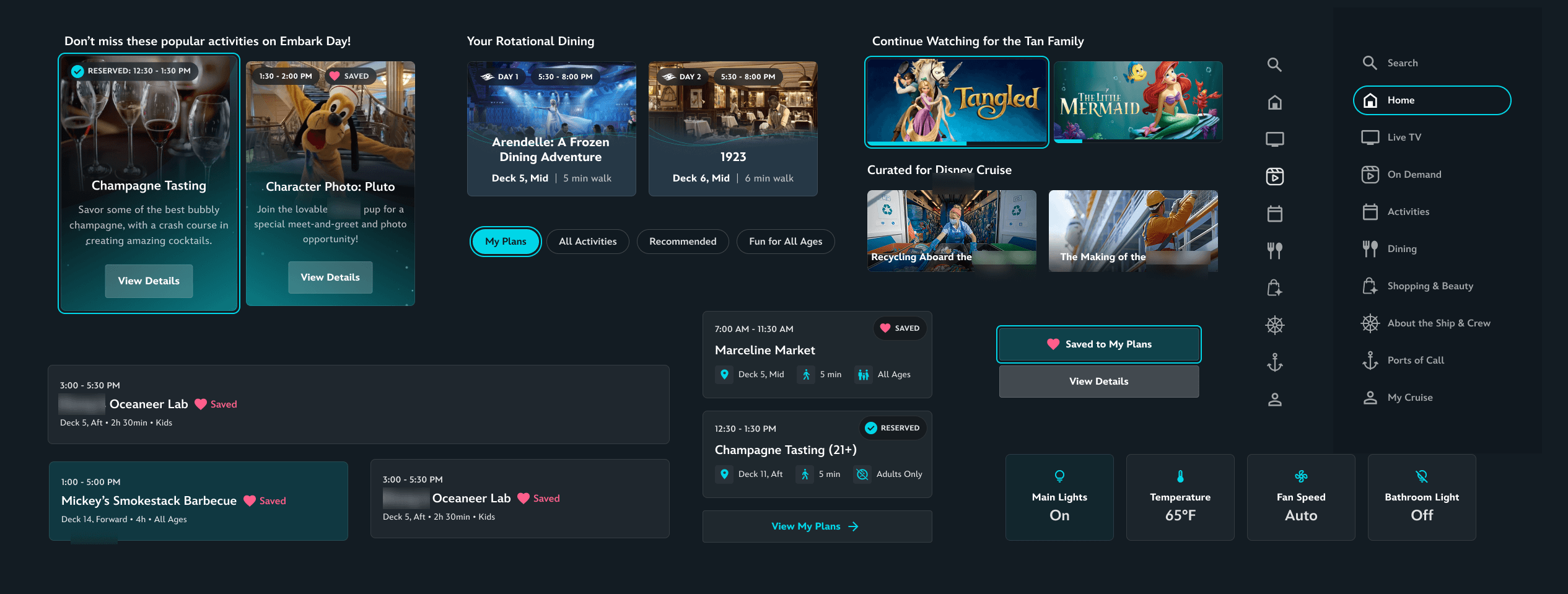
Samples of assets in the UI library
AI imagery in Midjourney
With the end-goal of creating an interactive prototype, we utilized one of our personas to have the prototype itself to tell a story by generating consistent imagery in our client's style.
utilized our client's iconic characters, mascots, and modern animation style to generate cruise-related imagery for onboarding and cruise-related entertainment
Generated a series of images of the same family as they experienced different aspects of the cruise
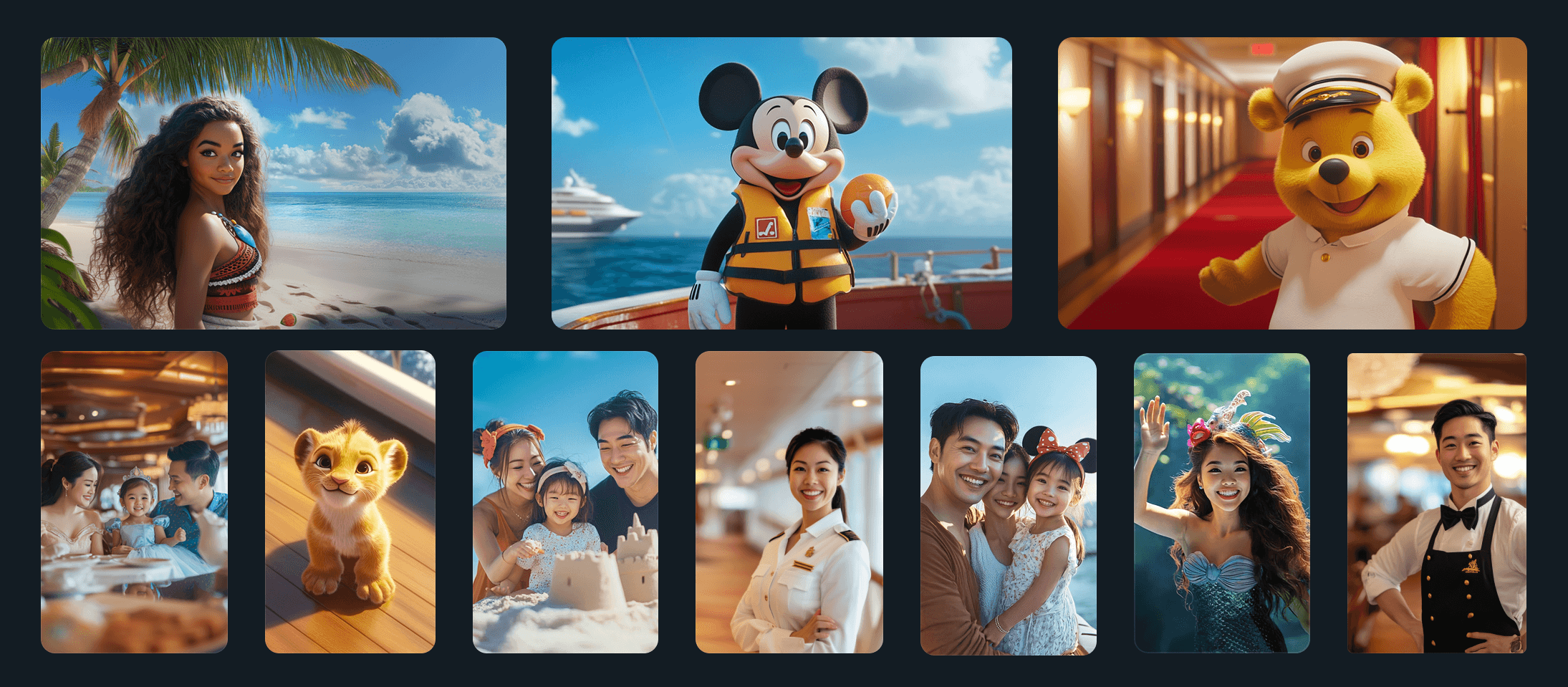
AI generated images that replicated our client's classic look & feel
Validating screen UI
Once the first round of wireframes were approved for the Home, Live TV and Streaming screens, I got to work applying UI to the screens and validating the styles, adjusting our library as needed.
Already designed UI elements were applied and imagery was implemented
Strong, intentional imagery was implemented from the start as it was such a large part of the entire visual design
Applying the visuals, such as the full-bleed video on landing, defined what direction the remaining wireframes would go in. The second round of the remaining wireframes went twice as fast after validating the UI on the first 3 sections.
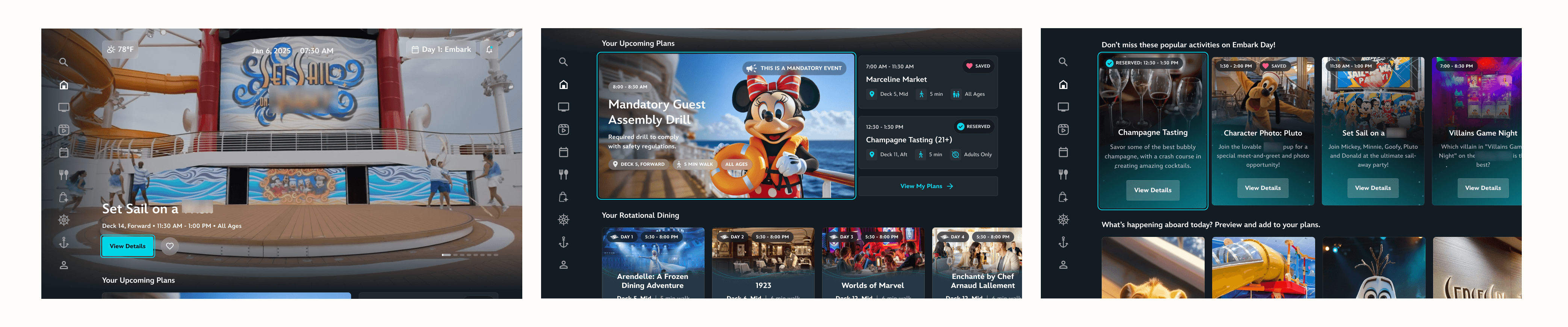
designs for Home screens
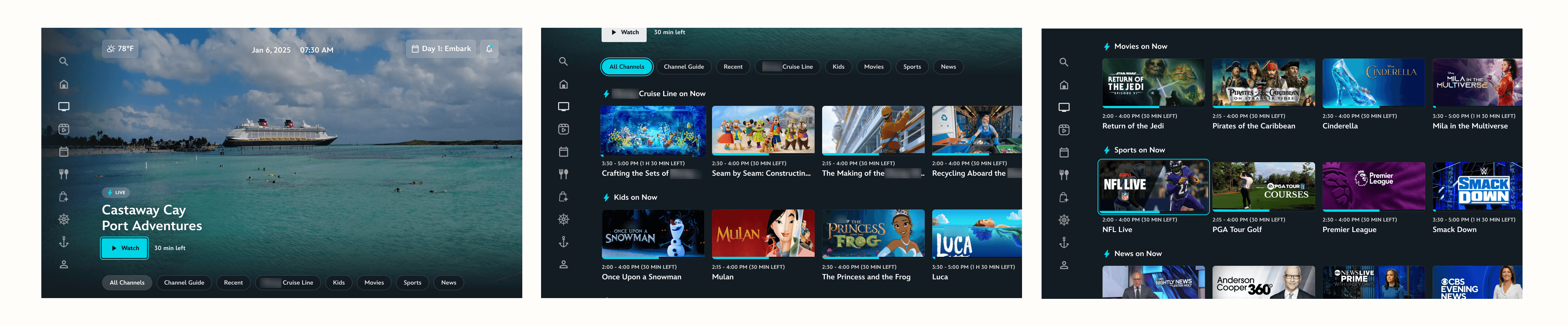
designs for Live TV screens
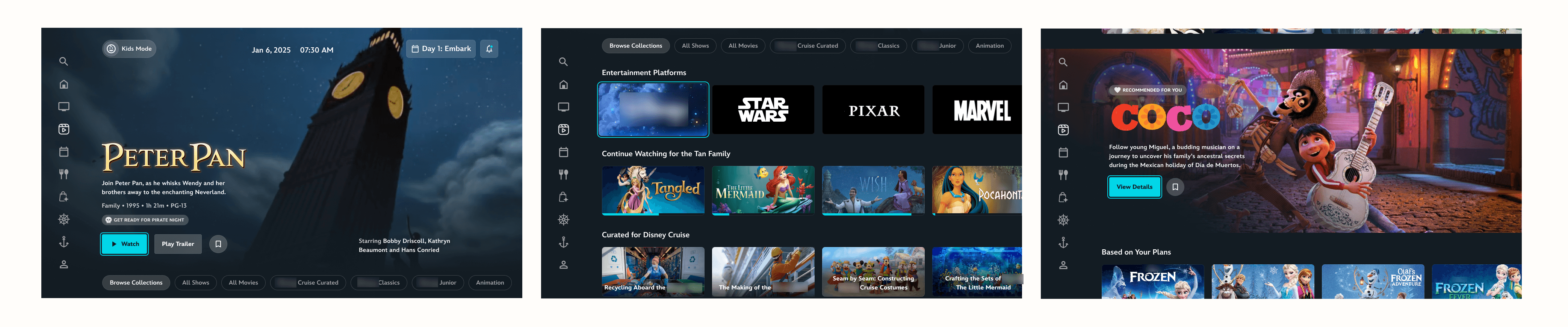
designs for Streaming / On Demand screens
03 - Integrated Experience
After the first 4-6 weeks, we had successfully designed the screens for what felt like it could be an MVP for a different client. But again, our client didn't want to match the value of competitors, but go beyond the value of competitors. So, we revisited our workshop notes from the research phase and determined where we could add details that would provide that value by understanding both our client's and their consumer's needs.
Event-based entertainment
Guests who participate in on-board activities both spend more money and have higher satisfaction scores.
So, while having a best-in-class TV experience was a priority, it also had to be balanced with getting users off the TV and back into real-life experiences.
using creative, visual devices to advertise onboard events, send reminders, and encourage participation
offer entertainment parallel to real-time events occurring onboard
a mix of both full-screen & more subtle reminders, blended in without being obstructive
Utilizing the splash screen, Home screen, and scrolling algorithm to encourage guests to leave their cabin and attend events
Curated social media integration
Apps like Instagram Reels and TikTok have redefined what a professional video can look like and made short-form, snappy entertainment very popular.
While not being true social media integration, our team thought offering a series of curated, short-form videos would be a creative way to quickly highlight different activity options in a familiar media form.
offers short-form video in-line with other entertainment options
once watching a short-form video, can scroll up/down in a familiar pattern to other video apps
opportunities to highlight popular influencers & popular actors in the client's universe to grab attention in a more relatable way
Utilizing short-form content to promote various cruise offerings
Sales opportunities
Of course, you can't convince everyone to turn off the TV and leave their suite if they don't want to.
We ideated on ways to come up with sales opportunities via in-TV purchase, and landed on designing a photo-purchasing experience (which in turn, would also highlight the family's experiences on the cruise and sell the story we wanted to tell).
on-board photographers can upload professional photos taken each day to a family's personal code
photos will then "magically" appear on the TV in the family's private suite for browsing and purchase
a streamlined flow allows the user to pick out their favorite photos and guide them to a checkout within the cruise app
We also incorporated Housekeeping & Room Service offerings into the TV capabilities.
We prototyped a concept for the Housekeeping order experience.
streamlined flow demonstrates ease of access for users to acquire basic housekeeping offerings
real-time updates gives users feedback on when to expect delivery
Creating sales opportunities via in-TV purchase to order
Housekeeping & ordering Room Service are seamlessly integrated, with real-time delivery notifications and feedback
04 - Final Deliverables
I stepped away from the project after the UI was established, initial concepts were finalized, and development work began. When it was time to prepare the pitches, I jumped back in to elevate the MVP prototype with attention-grabbing animations, ensure attention to detail, and to curate unique pitch materials.
Beginning-to-end cruise experience
We wanted to prove that our design was extremely dynamic, able to update according to the time of day, location of the ship, activities happening onboard, and recent memories captured by professional staff photographers.
So, we created used the template we designed and demonstrated the story of our family experiencing each day of the cruise.
morning Home offers a video setting expectations for the day, whether it's your first day aboard, a port day, or just another day on the ship
evening Home might offer a look into memories created that day, provided by professional staff photographers, or simply suggests a movie inspired by the activities the family experienced that day
Other concepts include reflecting the general age group of the guests, promoting a high-sales or low-attended activities, ship emergency alerts, and more
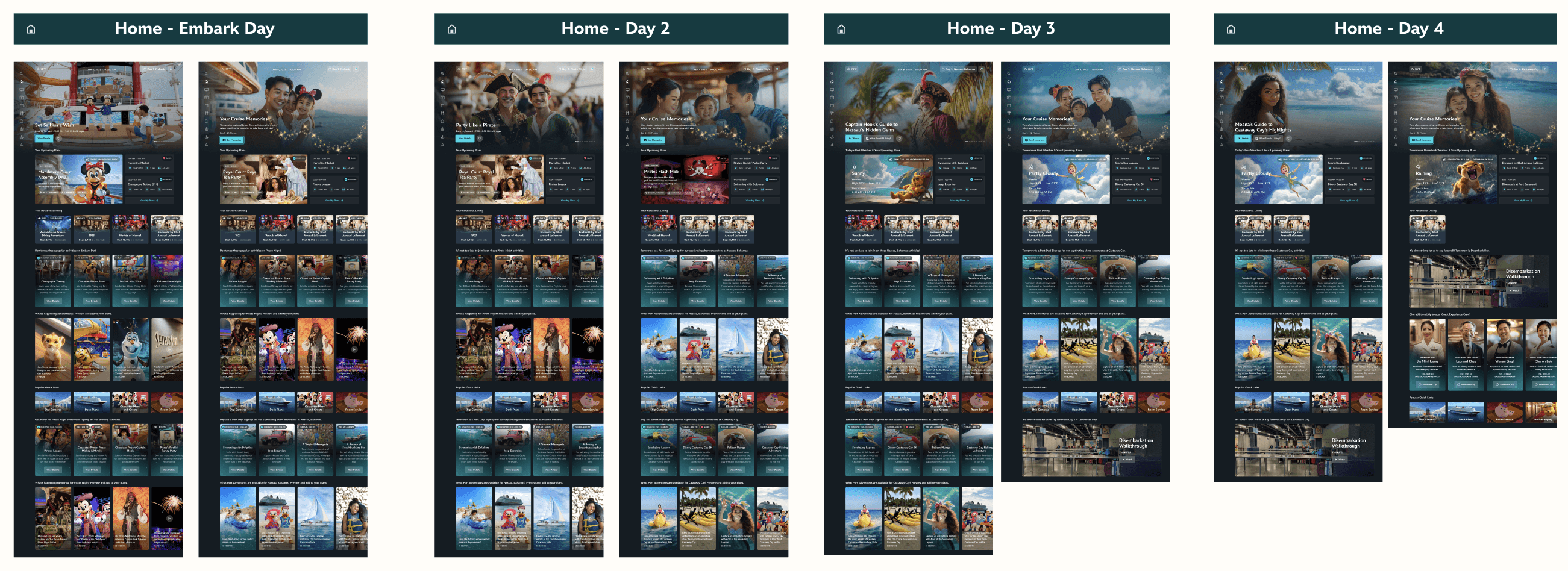
Home landing screens designed for beginning & ending each day of the cruise, a portion of the examples made to show potential dynamics
Additional concepts
Initially, the other designer and I divided the additional concept screens between each other. Below are a sample of a few that I worked on designs for, including language setup, weather icons, the stateroom experience, home screen notifications, and professional photo purchase.
The division of work then shifted and I ultimately focused on perfecting the main prototype while the other designer finalized the additional concepts.
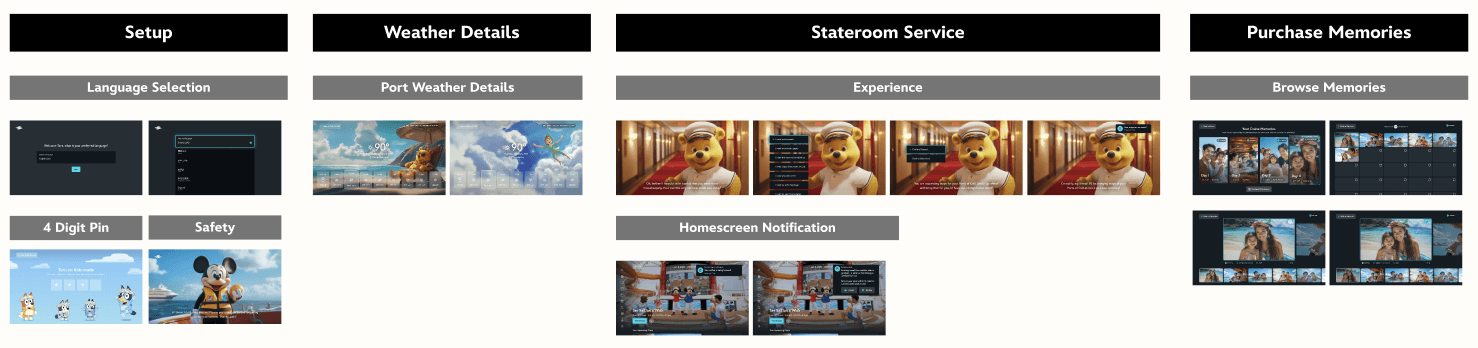
Finalized screens for additional deliverable concepts to be prototyped
Interactive MVP Prototype
Along with all of our concept screens, we also created a working prototype that demos a version of each landing page in the navigation, and some additional concepts.
Throughout our work, I paid extra attention to small details and microinteractions that made the magic of the prototype feel real.
Click through the final MVP prototype deliverable below:
My Final Takeaways
Designing for a different digital landscape is a refreshing challenge.
I remember early on in the design process, realizing that – for TV – everything was button. If it exists on the TV screen, unless it is a section title or clear that the feature exists in the background, it should probably be a CTA. Once I got used to designing that way it was fine, but the first few days I had to stop and check the usability constantly. It was a great lesson in intentionality, and brought a lot of awareness to general accessibility in my design work.
Clients that appreciate thorough, imaginative idea generation are rare – take advantage.